Help with setting up my gear.
Moderator: TGN
-
chippyrick
- New member
- Posts: 3
- Joined: Tue May 05, 2015 11:42 pm
Help with setting up my gear.
Yo. First post on the forums. I have recently started delving into hardware after using solely using software for like..three years. Anyway I've acquired a lot of gear without really having a solid understanding of it all. I currently own the 404SX, an Audio Technica LP-120 turntable (the usb model. Going to cop a Pro-ject Phono Box to bypass the pre) a Mackie 1202 VLZ4 mixer, a Scarlett 2i2 interface and some JBL monitors. I really don't know what types of cables I need to setup my chain or the actual order of my chain. Anyone here willing to spell it out for me? Thanks a lot!
Re: Help with setting up my gear.
Hey Rick!
There is a few setup possible, but the simplest and requiring less cabling i think will be:
turntable > SP > mixer > here you can connect the main output to the monitors and the alt. output to the audio interface to record to the computer.
To connect the SP to the mixer you can use this cable on line 1 to 4

Or this on line 5-6 to 11-12...

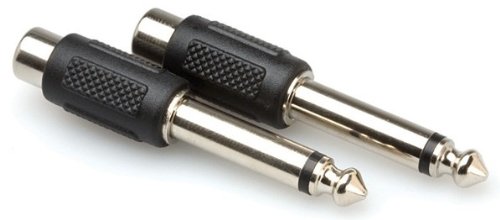
...or use this adapters.
Use this cable to connect the mixer to the audio interface...
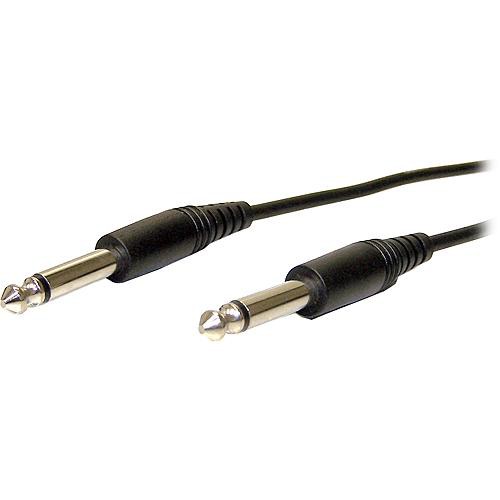
...and this for the monitors.

There is a few setup possible, but the simplest and requiring less cabling i think will be:
turntable > SP > mixer > here you can connect the main output to the monitors and the alt. output to the audio interface to record to the computer.
To connect the SP to the mixer you can use this cable on line 1 to 4
Or this on line 5-6 to 11-12...
...or use this adapters.
Use this cable to connect the mixer to the audio interface...
...and this for the monitors.

-
chippyrick
- New member
- Posts: 3
- Joined: Tue May 05, 2015 11:42 pm
Re: Help with setting up my gear.
Hey thanks a lot, otbt. On that second pic: those are TS cables, right?

-
Headphones

- Member
- Posts: 1081
- Joined: Tue Feb 15, 2011 11:42 pm
- Location: Des Moines, WA
- Contact:
Re: Help with setting up my gear.
I prefer to use the cables in the 2nd pic than the adapters in the 3rd, but that's just me. 
Livin my life in da underground
Re: Help with setting up my gear.
No doubt, but when you already have some rca cables these adapters can be handy, just some electrical tape to fix them tightly and you're ready, plus they are very cheap.Headphones wrote:I prefer to use the cables in the 2nd pic than the adapters in the 3rd, but that's just me.
Re: Help with setting up my gear.
Word! I prefer the cables to adapters any day as well but I have an overflow of adapters & gaffers so I tend to get down with the ghetto-taped-adapter approach. Never done no wrong!otbt wrote:No doubt, but when you already have some rca cables these adapters can be handy, just some electrical tape to fix them tightly and you're ready, plus they are very cheap.Headphones wrote:I prefer to use the cables in the 2nd pic than the adapters in the 3rd, but that's just me.

(╯°□°)╯ ︵ [ニニニ] LOG TRAP
Re: Help with setting up my gear.
adaption is key! i rather have a box full of adapters than a cupboard full of cables. also they dont wrestle and tie up each other when i aint looking. adapters are more likely to fit in my pockets. and adapters are often the cheaper way.
also: LO-FInktanks around the world are currently researching the sonic potential of crusty ole adapter stacks maybe you find the golden combination!
also: LO-FInktanks around the world are currently researching the sonic potential of crusty ole adapter stacks maybe you find the golden combination!
Re: Help with setting up my gear.
btw great post otbt! as a possible twist to this setup i suggest plugging the Mackies main outs to the Audio interface and the monitors to the audio interfeces outs so you can hear what you recorded.
and as soon as there are more soundsources to sample from try plugging them to the mixer and sample from an AUX into the SP if you have the cables, its much convenient i find. just turn the AUX on a channel and send as much to the SP as you wish, but turn down the that channels fader first so you only hear the sent signal through the SP channel.
and as soon as there are more soundsources to sample from try plugging them to the mixer and sample from an AUX into the SP if you have the cables, its much convenient i find. just turn the AUX on a channel and send as much to the SP as you wish, but turn down the that channels fader first so you only hear the sent signal through the SP channel.
Re: Help with setting up my gear.
For sure, never done no wrong!medearis wrote:Word! I prefer the cables to adapters any day as well but I have an overflow of adapters & gaffers so I tend to get down with the ghetto-taped-adapter approach. Never done no wrong!otbt wrote:No doubt, but when you already have some rca cables these adapters can be handy, just some electrical tape to fix them tightly and you're ready, plus they are very cheap.Headphones wrote:I prefer to use the cables in the 2nd pic than the adapters in the 3rd, but that's just me.

Ghetto-taped... loool!
Re: Help with setting up my gear.
Maybe... like i said there are many setups possible, but if do like you say, you need to always turn the computer on to play the SP, because this interface have no other power source (like many usb interfaces i think). But you can plug the out of the interface to a mixer's channel and turn it's volume down when playing or recording the SP so there is no interference (phasing) and turn it up when you want to listen the computer... or you can use the headphones.k´rüöl wrote:btw great post otbt! as a possible twist to this setup i suggest plugging the Mackies main outs to the Audio interface and the monitors to the audio interfeces outs so you can hear what you recorded.

If there are enough cables i think it's possible with this mixer to make a connection that you will be able to sample in the SP the turntable and the computer (all that is plugged in mixer) at the same time. By plugging the turntable in the mixer's rca input, the output of the interface in a stereo channel, the alt. out of the mixer goes to the SP input, the SP output goes to the mixer, now the bal/unbal output goes to the interface to record to the computer and the balanced out to the monitors. In this case you need to turn the SP's channel volume down when sampling, so it will not sample itself. Maybe i'm wrong, not easy to understand when you have not the stuff in front.

i don't get what you mean here..k´rüöl wrote:LO-FInktanks around the world are currently researching the sonic potential of crusty ole adapter stacks maybe you find the golden combination!

-
chippyrick
- New member
- Posts: 3
- Joined: Tue May 05, 2015 11:42 pm
Re: Help with setting up my gear.
Thanks for all the constructive answers!