i have the opportunity to get a 555 for retarded cheap..
im hesitant because im not super crazy how the 404 is layed out and i know the 555 is similar but different...
what is this for
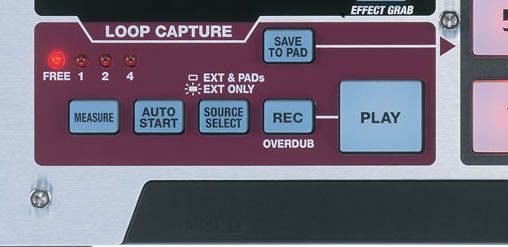
i can kind of grasp what the loop capture is for but there is like a 1 led a 2 led and a 4 led and the free led... also whats with the source select? im a little confused and should look up stuff in the manual online but my computer doesnt like pdfs that big.. any help or suggestions??
say you got one of your sequences playing...now you are listening to a record or playing keyboard while at the same time listening to the sequence, now you dont have to stop the sequence to grab the sample. similar to the feature on an MPC.
yo trust me man i havent had this much fun making beats in awile homie its a good machine in my opinion and if your gunna get it for dirt cheap thats a win win bro
The Measure button lets you automatically restrict the Loop Capture sample length to one, two or four bars, and Auto Start provides level-triggered sampling. Auto Start is really handy for quickly resampling individual pads (perhaps through the effects) and recording D-Beam synth riffs, although it tends to respond a bit late for things like drum loops/hits, even with the lowest level-threshold setting. The Source Select button lets you feed the Loop Capture section just from the mic/line inputs and D-Beam synth, which means that you can record ideas on the fly while pads are being played by the sequencer. Given that the D-Beam synth can't actually be controlled from the internal sequencer at all, Loop Capture is actually the best way to incorporate this in your programmed tracks.
:"...although it tends to respond a bit late for things like drum loops/hits, even with the lowest level-threshold setting."
The response of Autostart in Loop Capture really seems crappy, SO: wat about " the lowest level-threshold setting"? Is it possible to adjust for Autostart? I remember lookin for this sometime, but couldn´t find...
Greetz from the lab.
im not sure but i love loop cap its what i always use and its fine for me i build alot of tracks that way...like hit auto and record then play some shit with my midi from reason and then save to pad then overdub and save that to another pad and so on until a whole track is built....i cant see it as crappy but maybe your using it for somthing diffent then i do but all in all the 555 is sooo dope for me