..believe me I visited many, many pages but i didn't find a way to record vhs tapes to the computer?!
What do I need? My graphic card don't got a video input or sth but I got accsess to a computer with firewire?! Are there any video-input adapters?
I'm also looking for video editing program... one that got more possibilities than the w. movie maker...
Thanx
VHS to .avi ???
Moderator: TGN
-
wax inspektor

- Awesome Member
- Posts: 2383
- Joined: Thu Nov 22, 2007 9:09 pm
- Location: Berlin

I found this site http://www.access-programmers.co.uk/for ... p?t=101254
and this guy says to get a Tv card for the computer, but I think an easy way to do this is to get a dvd recorder and hook it up to your vhs player to copy, then take the dvd and rip it to your computer. That should work.
and this guy says to get a Tv card for the computer, but I think an easy way to do this is to get a dvd recorder and hook it up to your vhs player to copy, then take the dvd and rip it to your computer. That should work.

-
plexxsounds
- Member
- Posts: 366
- Joined: Mon Nov 12, 2007 12:00 am
- Location: finland
One solution is to use a digital video camera between the vhs and computer like this:
VHS ---svhs cable---CAMERA---firewire---PC
Then there are these boxes made for this, google for Pinnacle Video Transfer for example.
As for programs I'd look for Sony Vegas or Pinnacle Studio. Those are the only ones I've tried though. Sony Vegas is like AcidPro with video feature.
Pinnacle is more like "edit your wedding videos" type of thing but simple to use.
VHS ---svhs cable---CAMERA---firewire---PC
Then there are these boxes made for this, google for Pinnacle Video Transfer for example.
As for programs I'd look for Sony Vegas or Pinnacle Studio. Those are the only ones I've tried though. Sony Vegas is like AcidPro with video feature.
Pinnacle is more like "edit your wedding videos" type of thing but simple to use.
-
wax inspektor
- Awesome Member
- Posts: 2383
- Joined: Thu Nov 22, 2007 9:09 pm
- Location: Berlin
Thanx for the quick reply. The dvd recorder idea sounds clever but I don't even got a DVD / VHS player and my dvd rom (pc) is fucked up but I forgot to mention that I have this VHS camera which has video and audio outputs of course... Isn't there a cheaper way to get the cams output signals to somekinda pc input?
I mean there are adapters for everything out there...
Maybe sth. for the card slots or usb (firewire)?
cause all my pci slots are in use... so no space for a tv card, also.
hmmm... ??!
I mean there are adapters for everything out there...
Maybe sth. for the card slots or usb (firewire)?
cause all my pci slots are in use... so no space for a tv card, also.
hmmm... ??!
Last edited by wax inspektor on Tue Oct 21, 2008 12:20 pm, edited 1 time in total.

-
wax inspektor
- Awesome Member
- Posts: 2383
- Joined: Thu Nov 22, 2007 9:09 pm
- Location: Berlin
-
wax inspektor
- Awesome Member
- Posts: 2383
- Joined: Thu Nov 22, 2007 9:09 pm
- Location: Berlin
Drewzle wrote:good to see you're keeping things lo-fi !
Yeah isn't that cool.... beatmaking vid on VHS ?!

*shsh...rizzl rizzl*
*
Alright all those ideas were really clever... but the cheapest way is a tv card with video capture...costs only about 30€ !!!
... so my pci usb 2.0 card gotta go... no big deal...
Video are coming fam! I'm really excited...
I guess I'll start with a "whole process" video but first I need to get a video card... *whoosh*
**
I knew there is a adapter...
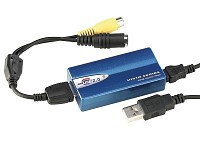
40€
Nice!

-
PHeMoX

- Most Helpful Member of the Year '09
- Posts: 2797
- Joined: Sat Oct 13, 2007 9:13 am
- Location: Netherlands
I'd go with the adapter that goes straight to USB.
Good luck and looking forward to seeing some movies!
Good luck and looking forward to seeing some movies!
"A man who misses his opportunity, and a monkey who misses his branch,
cannot be saved."
www.myspace.com/phemoxband
www.myspace.com/phemox
www.soundclick.com/phemox
cannot be saved."
www.myspace.com/phemoxband
www.myspace.com/phemox
www.soundclick.com/phemox
-
wax inspektor
- Awesome Member
- Posts: 2383
- Joined: Thu Nov 22, 2007 9:09 pm
- Location: Berlin
I'd prefer that one too but I just noticed that it requires a P4 /2,8Ghz.. I only got 2,2Ghz.. pretty oldschool...PHeMoX wrote:I'd go with the adapter that goes straight to USB.
So I guess I gotta go with the card. I'm just asking myself if my pc is too slow for video editing anyway?
(ram: 1,5ghz / cpu: 2,2ghz)
-
ColeRockLee

- Member
- Posts: 1202
- Joined: Fri Aug 10, 2007 4:35 am
- Location: Blytheville, Arkansas.
- Contact:

Try VirtualDub for editing your videos. It's freeware and has a load of features in it. Make sure your computer has lots of free hard disk space, like on the order of at least 100 gigs free. I highly recommend recording your video without compressing it, especially if you're going to use a USB device. The reasons being that digitizing video is a very resource consuming process and your CPU will be working up quite a sweat just trying to get the job done. Compressing it to DivX or whatever as it is being recorded will only slow the process down and you could get some glitches like dropped frames or messed up audio. You'll probably be doing some editing, so having the vids uncompressed beforehand will save you some quality loss.
EDIT: I made a quick tutorial on how to use it:
Click here to watch VirtualDub-Quick-Tutorial
Upload at Putfile
EDIT: I made a quick tutorial on how to use it:
Click here to watch VirtualDub-Quick-Tutorial
Upload at Putfile
--------------------------------------------
To the creative mind boredom is fleeting.
To the creative mind boredom is fleeting.