

without reading everything, have you tried verifying the cables/setup by hooking up something else to that input that the 404 is hooked up to?
And if it plays fine in your daw, it means it's not a software problem.
Sending out audio into DAW?
Moderator: TGN

Re: Sending out audio into DAW?
I honestly think it might be cable setup. This is what I have going from the outs of my sp to the ins of my audio interfacehseiken wrote:without reading everything, have you tried verifying the cables/setup by hooking up something else to that input that the 404 is hooked up to?
And if it plays fine in your daw, it means it's not a software problem.
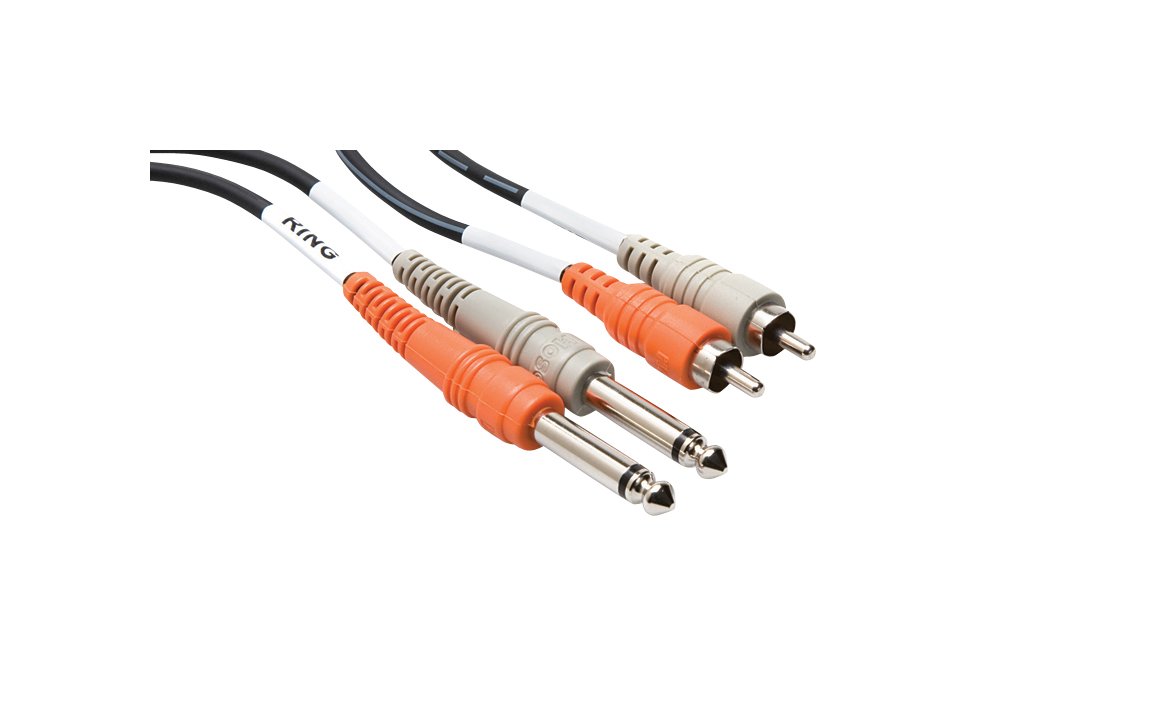
http://www.hosatech.com/dimg/768d508613 ... 8c6269.jpg
Maybe I need this instead? http://c1.zzounds.com/media/quality,85/ ... 4d3fc6.jpg
-
monstermanchild
- Member
- Posts: 102
- Joined: Fri Jul 27, 2012 3:34 am
Re: Sending out audio into DAW?
either that or only use 1 input on your interface. rca out->channel x that's a stereo cable. if you do that, unplug the other one, and select the channel you're going into on the track. (there's an drop down box where it will say 1/2 and have a little mixer bar in it. change that to just input x) that other cable is another way to go too. but this will save you a few bucks since I noticed that the 6i6 has stereo line inputs.
Re: Sending out audio into DAW?
Okay so now I've got the sp's output volume to come through my speakers at a normal level, but the signal still shows it coming in at -65 dbs in Ableton which makes no sense... (I even tried changing the input to 1/2, 1 ,2 and also from Auto to In. Still nothing. And as I mentioned earlier, it still only shows an incoming signal when I play a kick drum sample. Anything else shows no signal in Ableton.monstermanchild wrote:either that or only use 1 input on your interface. rca out->channel x that's a stereo cable. if you do that, unplug the other one, and select the channel you're going into on the track. (there's an drop down box where it will say 1/2 and have a little mixer bar in it. change that to just input x) that other cable is another way to go too. but this will save you a few bucks since I noticed that the 6i6 has stereo line inputs.
Re: Sending out audio into DAW?
By slapping on a compressor to the audio track and cranking up the output I've managed to increase the signal gain but when I play back what I've recorded in Ableton it's still insanely quiet even though the signal shows it as clipping. This is strange 
Re: Sending out audio into DAW?
Since the default input channels on the 6i6 are 3 and 4 I had to go into the Ableton settings and change the input from channels 1/2 to 3/4. Finally works!
Re: Sending out audio into DAW?
Now if only I could get audio into my 404 from ableton 


Re: Sending out audio into DAW?
try with headphone out with the cable you showed us ( http://www.hosatech.com/dimg/768d508613 ... 8c6269.jpg)Daylux wrote:Now if only I could get audio into my 404 from ableton
or go to ableton and choose the outs from there ,the focusrite outs..., not difficult now...
-
monstermanchild
- Member
- Posts: 102
- Joined: Fri Jul 27, 2012 3:34 am
Re: Sending out audio into DAW?
well if you're sampling from youtube or i tunes or something you can use a phone or an i pod or a cd player or something. also if you're using the sx you can just use the SD card. For sounds off of ableton, when you're done with them and you're ready to export, you can choose all tracks, which just exports each track as a wav.
Re: Sending out audio into DAW?
Yeah I'm trying to sample straight from ableton. I've got a cable going from the ins of my sp which then goes into output channels 3/4 on my audio interface.
Using this cable http://www.hosatech.com/dimg/768d508613 ... 8c6269.jpg
And I've selected "Master out: 3/4" in ableton, so technically it should be sending out the audio into my sp, but I'm not hearing any sound come out of my headphones (I'm using the 404 headphone jack) and pressing the ext. source pad... I can hear my machine's sounds through my headphones if I hit a pad, so I know the volume is fine and I know the headphones aren't broken.
Using this cable http://www.hosatech.com/dimg/768d508613 ... 8c6269.jpg
And I've selected "Master out: 3/4" in ableton, so technically it should be sending out the audio into my sp, but I'm not hearing any sound come out of my headphones (I'm using the 404 headphone jack) and pressing the ext. source pad... I can hear my machine's sounds through my headphones if I hit a pad, so I know the volume is fine and I know the headphones aren't broken.
Re: Sending out audio into DAW?
i've said two possibilitiesDaylux wrote: And I've selected "Master out: 3/4" in ableton, so technically it should be sending out the audio into my sp, but I'm not hearing any sound come out of my headphones (I'm using the 404 headphone jack) and pressing the ext. source pad... I can hear my machine's sounds through my headphones if I hit a pad, so I know the volume is fine and I know the headphones aren't broken.
1)if you want audio from headphone out, just plug that cable there
OR
2)if you want audio comin out from focusrite outs, then plug the other rca stereo cable in the outs (3/4) you choosen...
anyway, check if you have some sounds comin from headphone out (with headphones, i mean), you should ear something...
Re: Sending out audio into DAW?
Yeah I want to grab the audio coming from the scarlet outs. I have the stereo cable going into channel 3, and I also set the 404's channel to 3 by holding down pad #3 during power up. But when I select "Send audio out to: ext. channel 3" in ableton, I'm not hearing any sound come out of my 404. And yes I have the ext. source pad on 
Re: Sending out audio into DAW?
It works if I plug the cable into the headphone jack (like you mentioned) but I'm trying to make it work by using the outputs because of the sound quality.
-
monstermanchild
- Member
- Posts: 102
- Joined: Fri Jul 27, 2012 3:34 am
Re: Sending out audio into DAW?
You're overthinking this man. Outs 3/4 of focus rite to either input on the sp. set whatever track on your daw routed to out 3/4. Make sure outs 3/4 are on in the out configuration in prefs. Boosh pancakes. Check the monitoring knob on your interface because if you have it running back into ableton through a track you're going to get massive feedbAck. And there should be no difference in quality between your headphone jacks and outputs. They most likely run the same pres.
Re: Sending out audio into DAW?
That's the thing my man, I have it all set up the exact way that you said, but for some reason I just don't get any sound when trying to use the scarlet 3/4 outputs. But after adjusting a few knobs I managed to make the headphone output quality better, so I'm satisfied now!
Guess that is a wrap my friends...
Thanks for all the help sp fam. I have learned a lot throughout the process.
Much love,
Lux
Guess that is a wrap my friends...
Thanks for all the help sp fam. I have learned a lot throughout the process.
Much love,
Lux