can someone plz help me with triggering my 404 with the korg
Moderator: TGN
-
go for yours
- Member
- Posts: 15
- Joined: Fri Dec 29, 2006 3:50 am

-
Dj Frantic
- Member
- Posts: 1161
- Joined: Thu Dec 28, 2006 4:07 am
- Location: Miami FL
- Contact:
Ya man, hook up a midi cable between the two and then you gotta set the right notes/channel on the padkontrol. Your 404s manual will tell you what notes you need to program into the pad control and what channels.
"Tellin my people we can flee to advantage but man is still a man and where he stands he'll leave damage" -Qwel
www.myspace.com/djfrantic
www.myspace.com/djfrantic

Here's what I would do:
I open the padcontrol manual which I downloaded from the Korg website (I don't own a padcontroller) and on page 20 of that manual I find te complete explanation on how to assign a note number to a pad. Now you might wonder what note numbers to use, therefor I look in the sp-404 manual that came with my trusty 404 and I look in the chapter that talks about Midi implementation 'cause it's midi we're talking about right? So I end up on page 51 of the 404 manual where it states that note numbers go from 46 up to 118. Now with the info found in these 2 manuals you should be able to make the correct settings in your pad controller.
Also make sure the padcontroller and the 404 talk to eachother on the same midi channel (404 manual pg 41 and padcontroller manual pg 20).
A good midi cable from the pad controller into the 404 will do the rest of the work.
See that's how I always been dealing with MIDI issues long before there was an internet; I read manuals. This whole procedure took me 10 minutes in total including typing this post. If you still don't have a clue what we're talking about then it's about time you learn a thing or two about MIDI http://www.tweakheadz.com is an excellent start.
I open the padcontrol manual which I downloaded from the Korg website (I don't own a padcontroller) and on page 20 of that manual I find te complete explanation on how to assign a note number to a pad. Now you might wonder what note numbers to use, therefor I look in the sp-404 manual that came with my trusty 404 and I look in the chapter that talks about Midi implementation 'cause it's midi we're talking about right? So I end up on page 51 of the 404 manual where it states that note numbers go from 46 up to 118. Now with the info found in these 2 manuals you should be able to make the correct settings in your pad controller.
Also make sure the padcontroller and the 404 talk to eachother on the same midi channel (404 manual pg 41 and padcontroller manual pg 20).
A good midi cable from the pad controller into the 404 will do the rest of the work.
See that's how I always been dealing with MIDI issues long before there was an internet; I read manuals. This whole procedure took me 10 minutes in total including typing this post. If you still don't have a clue what we're talking about then it's about time you learn a thing or two about MIDI http://www.tweakheadz.com is an excellent start.
Last edited by pt3r on Fri Jan 05, 2007 8:04 am, edited 1 time in total.
-
go for yours
- Member
- Posts: 15
- Joined: Fri Dec 29, 2006 3:50 am
-
go for yours
- Member
- Posts: 15
- Joined: Fri Dec 29, 2006 3:50 am
those are more numbers than pads, so how would i set that up? i got all my pdkontrol pads on ch.10, and i start the 404 up on ch. 10, but its still a nogo, and i switches to ac power and still nothing, to heads that know what their doing and i know their out there, what is it that im mssing? what is the final key peice? am i not truing it on the right way?, GET AT ME!!!!!pt3r wrote:Here's what I would do:
note numbers go from 46 up to 118..
Are you implying I don't know what I'm doing? That's a bit harsh but hey sticks and stones ...go for yours wrote:..., to heads that know what their doing and i know their out there, ....
Have your read that manual that came with your padKONTROL? If so you would have discovered this wonderful thing called scenes, whereby you can save all the settings assigned to the controllers and pads of the padKONTROL. The way to cover all the note numbers recognised by the sp-404 with the padKONTROL is to create different scenes. Since the padKONTROL has 16 pads you need 8 scenes to cover the whole range of 120 notes going from note 46 up to 118.
Now if you don't mind, I have other things to do and spoonfeeding is not one of those things.
Last edited by pt3r on Wed Feb 14, 2007 1:22 pm, edited 1 time in total.
-
go for yours
- Member
- Posts: 15
- Joined: Fri Dec 29, 2006 3:50 am
-
go for yours
- Member
- Posts: 15
- Joined: Fri Dec 29, 2006 3:50 am
i know you know what your doing but i know nickp has the same set up and i really want him to tell me what the problem is cause im forsure he knows
but yeah ok so i got my midi ch.on number 1 for my 404 and all the pad on the padkontrol, i start off on usb power hen i switch to ac, i turn my 404 on while holding the time/bmp down, it starts up i choose "aut", i have my midi cord conneced to both of course, both in the midi in. i press a pad on the 404 then the padkontrol then what? i get nothing
i could really use some help cause this is being a bitch
i would be much thanksful if anyone can help me figur out the problem
does it just not work with garageband or something cause i fell like im doing eveything right but its a nogo
but yeah ok so i got my midi ch.on number 1 for my 404 and all the pad on the padkontrol, i start off on usb power hen i switch to ac, i turn my 404 on while holding the time/bmp down, it starts up i choose "aut", i have my midi cord conneced to both of course, both in the midi in. i press a pad on the 404 then the padkontrol then what? i get nothing
i could really use some help cause this is being a bitch
i would be much thanksful if anyone can help me figur out the problem
does it just not work with garageband or something cause i fell like im doing eveything right but its a nogo
You should take it off "Auto" when the 404 starts up when you're holding TIME/BPM. Use Ctrl 1 or 2 (I think it's 2) to switch it to "OFF" so that you can control individual sounds and not sequences and everything won't be BPM'd together etc etc. I'm guessing this is the problem.
And once you make the selection it sticks so you won't have to start it up everytime and hold down TIME/BPM.
Here's what your setup should resemble (roughly) when using the PK as a midid controller to the 404:
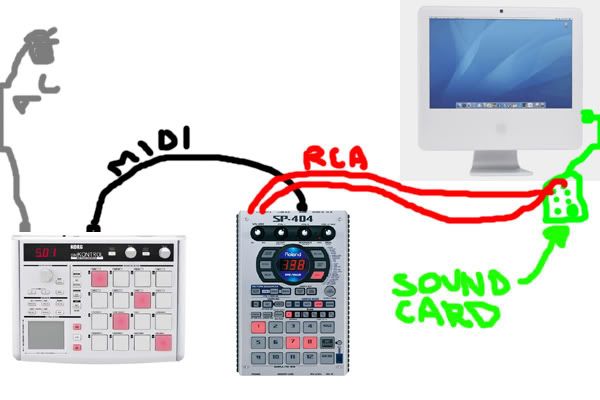
Or anyway that's how I use it and it works great. And I keep the Padkontrol USB'd to my computer so I can switch between banging on the 404 and banging on Reason's REDRUM with the flick of the Padkontrol's power switch (from AC to USB and back and forth etc).
I know I promisded the pic to ya sooner but I've been practicing DJing like crazy for a gig tonight. Gotta give'em their money's worth.
Hope it helps.
And once you make the selection it sticks so you won't have to start it up everytime and hold down TIME/BPM.
Here's what your setup should resemble (roughly) when using the PK as a midid controller to the 404:
Or anyway that's how I use it and it works great. And I keep the Padkontrol USB'd to my computer so I can switch between banging on the 404 and banging on Reason's REDRUM with the flick of the Padkontrol's power switch (from AC to USB and back and forth etc).
I know I promisded the pic to ya sooner but I've been practicing DJing like crazy for a gig tonight. Gotta give'em their money's worth.
Hope it helps.
Last edited by Nickp on Wed Feb 14, 2007 10:15 pm, edited 1 time in total.
-
go for yours
- Member
- Posts: 15
- Joined: Fri Dec 29, 2006 3:50 am
You can buy a cheap cable that goes from 2 rca to a mini stereo jack. Most cheap soundcards in computers have line input over mini stereo jack. This will be cheaper than buying a highend sound card.
LMWBAOgo for yours wrote:and spoonfeding? the plane ain't land in the hanger yet lol
Last edited by pt3r on Thu Feb 15, 2007 7:42 am, edited 1 time in total.
-
go for yours
- Member
- Posts: 15
- Joined: Fri Dec 29, 2006 3:50 am
-
kristoffer1989

- Member
- Posts: 301
- Joined: Mon Jan 15, 2007 7:43 am
- Location: Norway
- Contact: