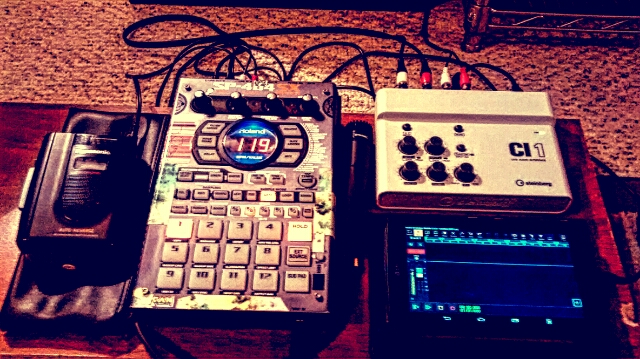
So I got a iPad the other day...

For all non Roland SP and MV gear.

Moderator: TGN

User avatar
Headphones
Member
Posts: 1081
Joined: Tue Feb 15, 2011 11:42 pm
Location: Des Moines, WA
Contact:

Re: So I got a iPad the other day...

Post by Headphones »

It probably can be done, but it's not something I have tried, so you need the Apple USB device, and a USB to midi cable, but you should be able to control your SP's with midi. I'm not sure which app will do this though.

Get the one with the most power and oomph if you can. There are sooooo many apps for sampling/synthesis/sequencing/fx, etc. You have to setup your account with Apple. All you need is a bank account and a debit card, and you're good to go. If any app you dl gets updated, it's free. I notice a lot of apps hardly ever update, so either they're lazy or too busy to fix bugs, but most everything I have dl worked(for version 8), and nothing I can think of has crashed too badly.

I try not to use it as a game machine, buuuuuuut, I do enjoy Simcity on it.
Livin my life in da underground
Deli_Cuts
Member
Posts: 25
Joined: Fri May 08, 2015 12:33 am

Re: So I got a iPad the other day...

Post by Deli_Cuts »

Used to make beats on my ipad, now I only do rough sketches on the go using the iMPC app...which is getting a good update soon.

My iPad mini isn't really just my ipad though...it's my cellphone...30 dollars a month for lte service and I downloaded google voice and all that to make the call...I'm totally beating the system lol

Ok I'm done..I sound like spam
korakios
Member
Posts: 447
Joined: Tue Nov 27, 2007 9:35 pm
Location: Greece

Re: So I got a iPad the other day...

Post by korakios »

Must recommend 2 drum machine apps:

Diode108 ultimate sample based drum machine and
Elastic drums awesome drum synth engine
User avatar
medearis
Member
Posts: 361
Joined: Sat Jun 21, 2014 1:17 am

Re: So I got a iPad the other day...

Post by medearis »

Not using an iPad but I've been using an Android tablet + Audio Evolution Mobile to record when I'm out & about. Rock solid. I can only imagine that an iPad would be "next level" in comparison, but this program really opened up my tablet's life. $10 well spent!

No animoog though. :lol:

Image
 (╯°□°)╯ [ニニニ] LOG TRAP
User avatar
Headphones
Member
Posts: 1081
Joined: Tue Feb 15, 2011 11:42 pm
Location: Des Moines, WA
Contact:

Re: So I got a iPad the other day...

Post by Headphones »

I haven't really considered any Android tablets, because somehow, I get the feeling that there just wouldn't be the variety of soft synths, virtual drum machines, samplers, fx, & DAWs that iPad already has. Usually, if http://www.synthtopia.com tells me about a new program to check out, I dl it(if it's cheap or free), and try for a bit. Sometimes it's fun, others seem tricky, or don't seem like I can do much with until I get a synth controller to use with my iPad.

My idea is a setup similar to yours, the iPad, idock, sp505, and studio monitors. But, knowing myself, I'd want to toss in my Mackie mixer, MF104m, Electrix MoFx, Korg electribes, Yamaha DX200, and any new purchases in there as well. (And a sp555 as well)
Livin my life in da underground
korakios
Member
Posts: 447
Joined: Tue Nov 27, 2007 9:35 pm
Location: Greece

Re: So I got a iPad the other day...

Post by korakios »

Hey medearis,
Check out Caustic app too,
http://www.singlecellsoftware.com

There is a free demo for Mac/PC to try :)
User avatar
medearis
Member
Posts: 361
Joined: Sat Jun 21, 2014 1:17 am

Re: So I got a iPad the other day...

Post by medearis »

@Headphones - I ended up with it for "free" when I swapped my phone service. Snagged the DAW on sale so figured I might as well do something with it. Pretty cool for scratch recording so far. It is like a Zoom handheld on 'roids!

@Kora - I will check it out. Admittedly, I feel getting an iPad would save a lot of let diwns when it comes to synths. Looks cool.
 (╯°□°)╯ [ニニニ] LOG TRAP
korakios
Member
Posts: 447
Joined: Tue Nov 27, 2007 9:35 pm
Location: Greece

Re: So I got a iPad the other day...

Post by korakios »

medearis wrote:@Kora - I will check it out. Admittedly, I feel getting an iPad would save a lot of let diwns when it comes to synths. Looks cool.


I would hold on getting an iPad for the moment until iOS 8 is stabilized. But for sure don't get anything less than iPad Air . iPads 2,3 and the first mini are too old to run some demanding apps.
User avatar
formal
Member
Posts: 1200
Joined: Sat Mar 14, 2009 7:52 pm
Location: PDX, OR
Contact:

Re: So I got a iPad the other day...

Post by formal »

Using an iPad for anything useful only requires an additional $30 (for the usb input adapter), which opens up the use of USB music related gear. Some things that I use this module for.....

- USB Soundcard (berhinger ufo202)
- Midi in/out (maudio uno)
- midi controllers
- USB Mics

Most music apps that aren't free generally support all these features. I've been using my iPad this way for 5 years and the support and ease of use has only gotten better over time.

Beatmaker 2 is pretty much all I use for sequencing/midi and all that jazz. It's my go to. https://www.youtube.com/watch?v=NOaWkzzHEMA
User avatar
medearis
Member
Posts: 361
Joined: Sat Jun 21, 2014 1:17 am

Re: So I got a iPad the other day...

Post by medearis »

@kora - I'm in no rush. It's been on my radar for a while now and I still haven't jumped on it yet. I have plenty to keep busy with for the time being anyway. :lol:
 (╯°□°)╯ [ニニニ] LOG TRAP
User avatar
jbl
Member
Posts: 1370
Joined: Sat May 26, 2007 7:12 am
Location: tohoku, japan

Re: So I got a iPad the other day...

Post by jbl »

if i'm being honest; i can't make shit on my ipad. I just get distracted every time.
I love samplr. There are some other really good apps too. Someone (not me obviously) could make some real fire on an Ipad these days bc you can do anything with it now that there is audiobus and the ability to insert effects with synths, samplers, loopers and drum machines.
insert funny comment here.
http://soundcloud.com/jon-ill
User avatar
strayexcel
Member
Posts: 49
Joined: Fri Jul 10, 2015 12:44 am
Location: california
Contact:

Re: So I got a iPad the other day...

Post by strayexcel »

Has anyone ever come in contact with this lil joint?

http://www.sweetwater.com/store/detail/iTrackDock

looks very useful. especially if i want to arrange tracks on my lunch break.
Last edited by strayexcel on Fri Jul 31, 2015 6:23 pm, edited 1 time in total.
distorted
Member
Posts: 93
Joined: Sun May 04, 2014 1:12 am
Location: New York

Re: So I got a iPad the other day...

Post by distorted »

strayexcel wrote:Has anyone ever come in contact with this lil joint?

http://www.sweetwater.com/store/detail/iTrackDock

looks very useful. especially if i want to arrange tracks on my lunch break.


I'm looking to get one soon. It'll fit my iPad Mini 2 perfectly. I have a Scarlett 2i2. So I'm sure the iTrack Dock will live up to my expectations.
distorted
Member
Posts: 93
Joined: Sun May 04, 2014 1:12 am
Location: New York

Re: So I got a iPad the other day...

Post by distorted »

I was just beta testing this app and now it's available for free in the iTunes store.

http://youtu.be/oa7dXxHbEvE

Link to MIDI connects ABLETON LINK to musical devices that support MIDI Clock Sync. Simply join a Link session, connect your MIDI device, and that’s it. Your MIDI device is now Link-enabled.

Link to Midi features launch quantization, an incredibly stable clock output, and a fine offset control (±250 ms) to perfectly line up the receiving MIDI device’s playback.

NOTE!

Link to MIDI is only recommended for use with hardware MIDI devices. Connecting to apps is possible, but may lead to a poor user experience due to software challenges in synchronizing to MIDI Clock. Ableton Link fixes this.

Please contact the developers of your favorite apps and ask them to support Ableton Link.

WHY USE IT?

In musical setups that include Link, Link to MIDI makes a connected MIDI device behave like a Link-enabled device.

More specifically, using Link to MIDI’s Play button, you can start and stop the connected device at any time, and the device will start playing, in phase, at the next quantization tick — set by the Launch Quantization parameter on the main interface.

This is contrast to the typical MIDI Sync implementation, which requires all connected devices to start at the same time and continue playing — otherwise, if you stop, you risk losing beat phase.

NOTE: This is essentially Link to MIDI’s only function!

It may not seem like a big deal, but the freedom to turn your devices ON and OFF at any time can have a huge effect on workflow (at least it does for me).

Also, when the transports of all your devices behave in a consistent way — whether it’s Ableton Live, a Link-enabled iOS app (like FUGUE MACHINE!), or a drum machine built 30 years ago — it’s, well, pretty nice :]

http://alexandernaut.com/linktomidi/

https://appsto.re/us/tYsJ_.i

I have Korg Gadget synced up to ReBirth and it's pretty tight. But it's even more fun having apps like Gadget or iElectribe synced to my SP's sequencer while having the audio running through it and using it's effects.
Post Reply