Page 2 of 2
Re: SP-555 Driver and Win 8.1
Posted: Thu Nov 13, 2014 1:09 pm
by Magnuzoid
Do you know if a CF card reader that reads Type 2, can read Type 1?
I've just borrowed one and not sure about the differences - only that Type 2 is 1.5 cm taller

Re: SP-555 Driver and Win 8.1
Posted: Thu Nov 13, 2014 3:59 pm
by korakios
It should read type 1. But you can just plug it and try it

Re: SP-555 Driver and Win 8.1
Posted: Thu Nov 13, 2014 4:57 pm
by Magnuzoid
yeah had it with me home and of course it doesn't turn on..
patience is running out

Re: SP-555 Driver and Win 8.1
Posted: Sun Nov 16, 2014 10:11 am
by korakios
You may try different usb ports .On some desktop computers the front usb ports cannot feed the proper power ,so try using the back ports.
Although a CF Reader does not require so much power

Re: SP-555 Driver and Win 8.1
Posted: Mon Jun 01, 2015 9:38 am
by DiamondsInside
Re: SP-555 Driver and Win 8.1
Posted: Sun Aug 21, 2016 9:36 pm
by regis
Hi folks, I'm new and just bought a SP-555 two days ago.
I just did Diamondsinside's procedure as described above and it doesn't work.
I also tried the Mac -> System -> Library -> CoreServices - systemversion.plist Hack to fake the Systemversion to allow the 10.8 driver install and it doesn't work either.
Any other tips how to make it work with USB and Win 8.1.
Thanks!
Re: SP-555 Driver and Win 8.1
Posted: Fri Feb 24, 2017 4:36 pm
by doppelganger
Just posting to let anyone know it's possible to install SP-555 drivers under windows 10 using the windows 8 drivers and some modifying.
I edited the RDIF1072.conf file inside the 'Files > 64bit > Files' folder of 'sp555_win8d_v100.zip' I downloaded from the official SP-555 driver site.
Adding the line:
;; Windows10
underneath the header:
[Roland.NTamd64.6.3]
when opening the .conf file in notepad.
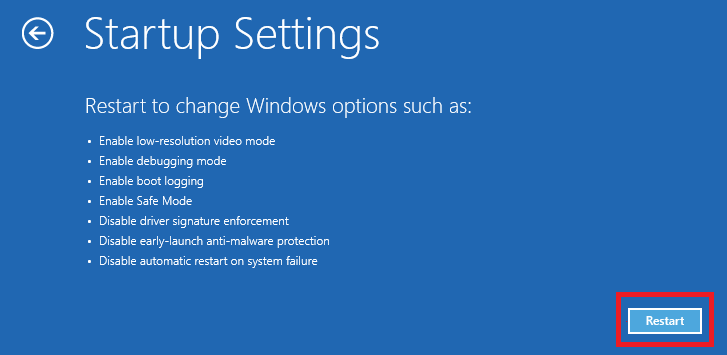
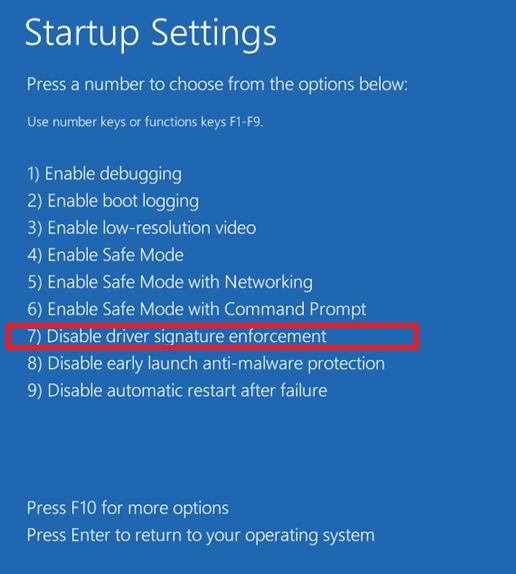
I also followed DiamondsInside's instructions of allowing windows to install unsigned drivers before actually executing the Setup file (in the same 64bit folder) and installing it with the modified .conf file.
Re: SP-555 Driver and Win 8.1
Posted: Fri Mar 24, 2017 11:38 pm
by LevelAte
I can't make it work on Windows 10, dmn, that is really sad. I did everything like instructions in this topic said, but I get stuck here, though the system can see that my sp-555 is connected, the driver installation just doesn't go anywhere further. Was anyone able to manage this problem and install it on Windows 10? My new laptop has no support for Windows 7, and Windows 8 is too disgusting, I dunno what to do, shoooot

Re: SP-555 Driver and Win 8.1
Posted: Sat Mar 25, 2017 11:00 pm
by modii
Hey guys new here.
I'm currently running Windows 10 64bit and nothing from above is working. Like the guy above me, it doesn't seem to recognise the 555, even though my windows does.
I have tried doing all the basic stuff, restarting, re-downloading, opening as administrator etc
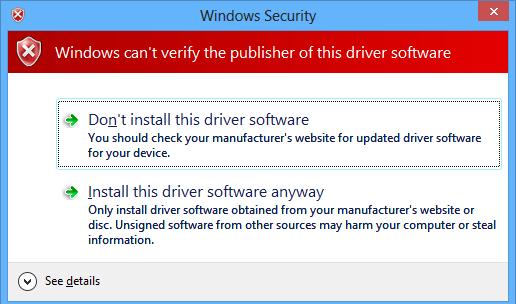
I have tried what DiamondsInside said, and in step 7 no security windows popped up, it just said it was successfully installed.
However when I go to my devices in the control panel, what I get is this
https://gyazo.com/c478da5a16d9cee3b9f4ca0a281a1d74 and as usual troubleshooting didn't do anything.
I then tried what doppelganger said, well first there isn't a RDIF1072.conf file, the most similar thing I could find is the RDIF1072.inf file, however I supposed that it was the same thing since I was able to edit it. So I did it, and again, same problem as before it says I successfully installed it but in the devices, its not working.
Any help would be fantastic, for real I would appreciate it a lot.
Re: SP-555 Driver and Win 8.1
Posted: Wed Apr 19, 2017 4:49 pm
by LevelAte
LevelAte wrote: Was anyone able to manage this problem and install it on Windows 10?
Up
Re: SP-555 Driver and Win 8.1
Posted: Thu Aug 03, 2017 3:59 pm
by em-ji
Probably little help for many here, but the sp555 is full compatible with linux! Tested on Ubuntu 14.04.
Re: SP-555 Driver and Win 8.1
Posted: Tue Sep 12, 2017 3:11 am
by Ots
LevelAte wrote:I can't make it work on Windows 10, dmn, that is really sad. I did everything like instructions in this topic said, but I get stuck here, though the system can see that my sp-555 is connected, the driver installation just doesn't go anywhere further. Was anyone able to manage this problem and install it on Windows 10? My new laptop has no support for Windows 7, and Windows 8 is too disgusting, I dunno what to do, shoooot
I had the same problems, and finally found the solution:
http://techiesexpedition.blogspot.com.b ... ws-10.html
It works like a charm
Re: SP-555 Driver and Win 8.1
Posted: Tue Oct 24, 2017 9:51 pm
by LevelAte
Ots wrote:LevelAte wrote:
It works like a charm
Yeah booooy! It does! Thank you too